

Walking through the Discord "create a ticket" scam
Scammers are building fake support desks for Discord communities. I followed one to see what a member sees at each step. This post walks through it, then puts it next to a second campaign Daxeon observed across 14 communities in one month, so that you can recognize the pattern before a member follows the link.
Do not repeat this yourself. I followed this scam on purpose, in a secure environment, for this article. Investigating scams is part of my job, and I knew in advance where to stop. There is nothing to learn from the inside that this post does not show you. If you see one of these messages, report it to your community's staff and leave it there.
A new twist on an old scam technique is targeting thousands of Discord communities. Here, I will do a deep dive into what Daxeon has seen, how the scam works, and how to protect yourself and your community.
To do that properly, I followed one such scam myself. I clicked the link, followed the scammers' instructions, and stopped at the point where continuing would have meant handing over anything real. The screenshots below are from that walkthrough. Where I describe the campaign at large, the numbers come from Daxeon's logs, and I say so.
The campaign I walked through and the campaign in our logs are different operations, with different servers, different X posts and different destination sites. That two unrelated operations share every step in between is the point of this post.
TL;DR
- The scam mimics a legitimate support process. Members are told to "create a ticket" and given a link to follow.
- The link typically leads to a server the scammer controls. In one specific campaign we watched, that server was named Create A Ticket and had 2,293 members.
- In August, 65 accounts posted that message over 100 times across 14 of the communities which Daxeon protects.
- The invite arrived in three different formats. The plain invite and the app-authorization link are blocked by an invite filter. The third wrapper hides the invite inside a post on X, which is rendered in an Embed within the Discord chat.
- This campaign targets crypto communities. Only the final ask is specific to crypto; any community that runs support through tickets is exposed to the same message.
- I followed a similar campaign's flow to the point of the ask.
- It led to a fake website with a fake, but convincing, wallet extension, where I was prompted to enter my seed phrase.
Following the fake support ticket, step by step
Step 1. The message in the community
It all starts when a user asks an innocent question. In this particular case, it was a question a user was asking as part of a regular conversation in a crypto-focused community, not related to an issue. The scammer quickly responded with a short, friendly message that seems like it could come from a staff member: "create a ticket 👇" with a link. In the version I followed, the link was to an X post, and Discord rendered that post as an embed under the message. The scammer's account was likely a compromised account. It existed since 2022, it had a bio that gave a brief overview of who they were and their interests, and they had a profile picture.
Step 2. Joining the server
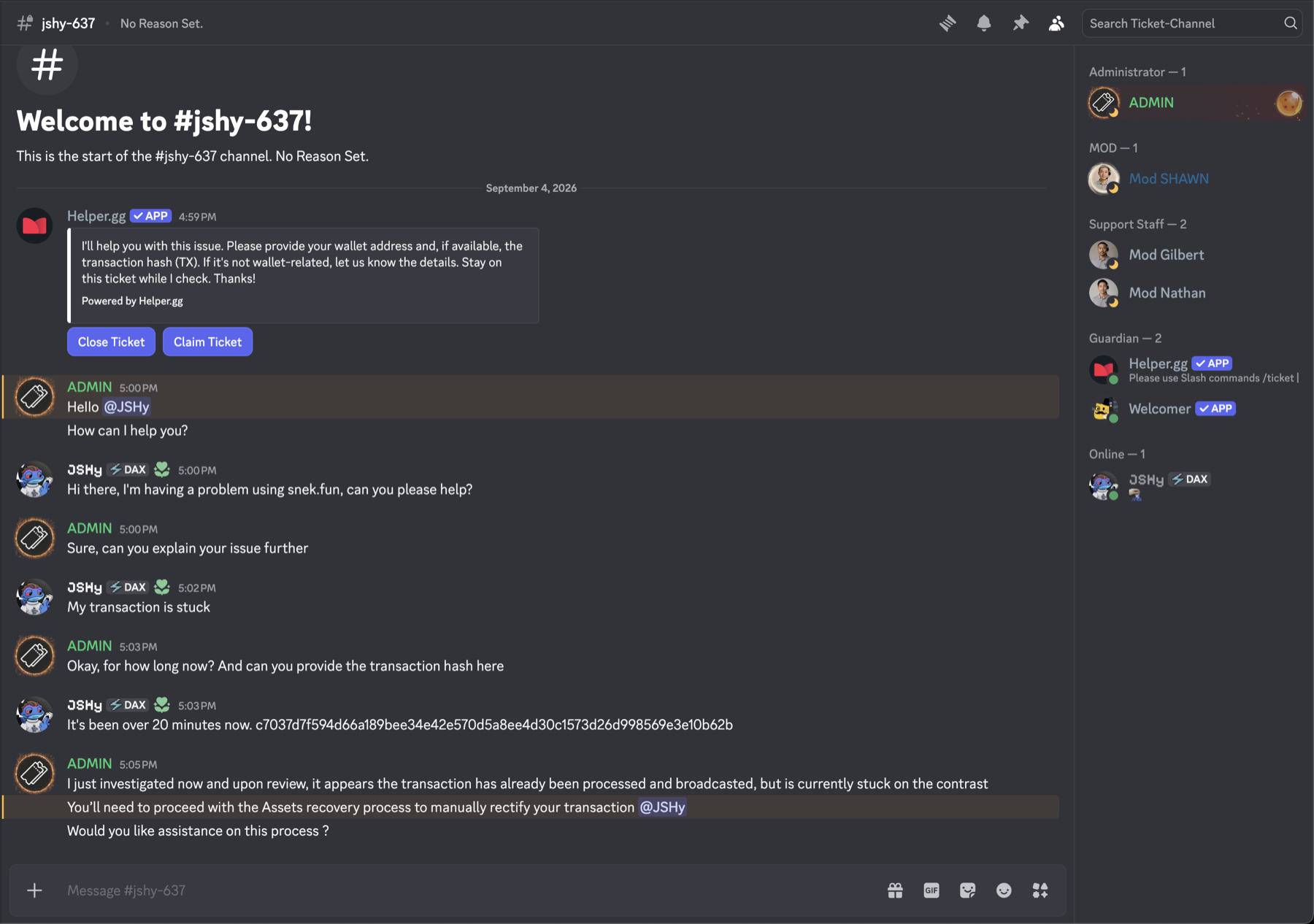
The invite took me to a server named "Ticket-Channel". It had two text channels, a welcome channel and a support channel, and the only content in it was an instruction to open a support ticket.
The member list did the work of looking legitimate. It was full of price bots, bots whose display names show the live price of an asset, the kind of decoration a busy trading community keeps in its sidebar. Above them sat a couple of accounts with moderator roles and one administrator.

Step 3. Opening a ticket
The ticket bot was real. The server ran helper.gg, a public ticket bot that legitimate communities use, which is a sensible choice for a scammer since it would be familiar to a victim. I clicked the button and it opened a private ticket channel, the same way it would anywhere else.
Step 4. The conversation
The administrator answered quickly and asked how they could help. I said I was having a problem with a transaction, since this scam was targeting a crypto community. They asked for the transaction ID. I gave them a made-up hash, a string of the right shape that corresponds to no transaction on any chain. They came back to say they had found the issue, and that I would need to go through the "asset recovery process". That process, needless to say, doesn't actually exist.
Step 5. The ask, and where I stopped
The link was labelled "Snek.Fun RPC Hub", a service that does not exist, wearing the name of a real Cardano project. It resolved to a malicious website, which presents a recovery process.
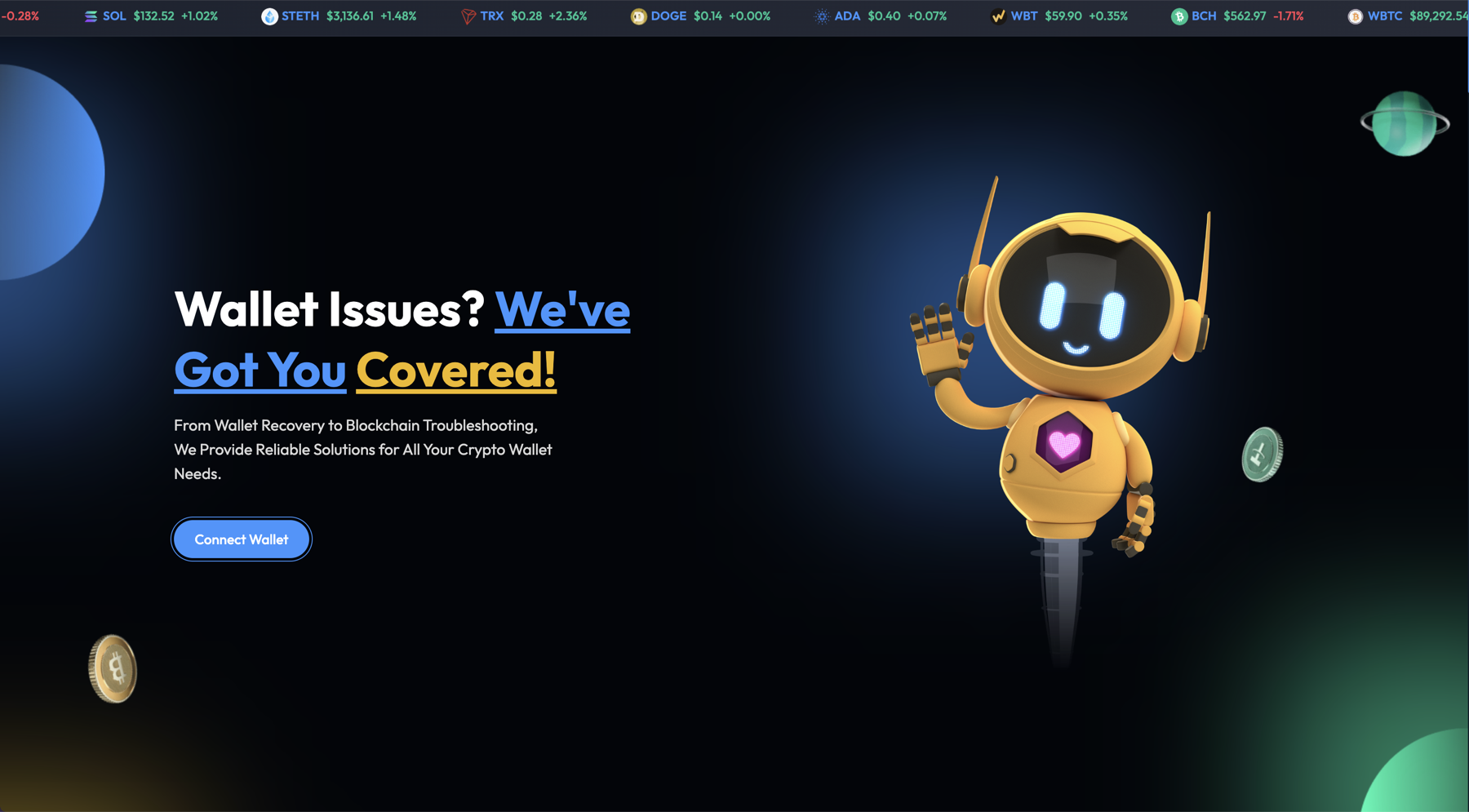
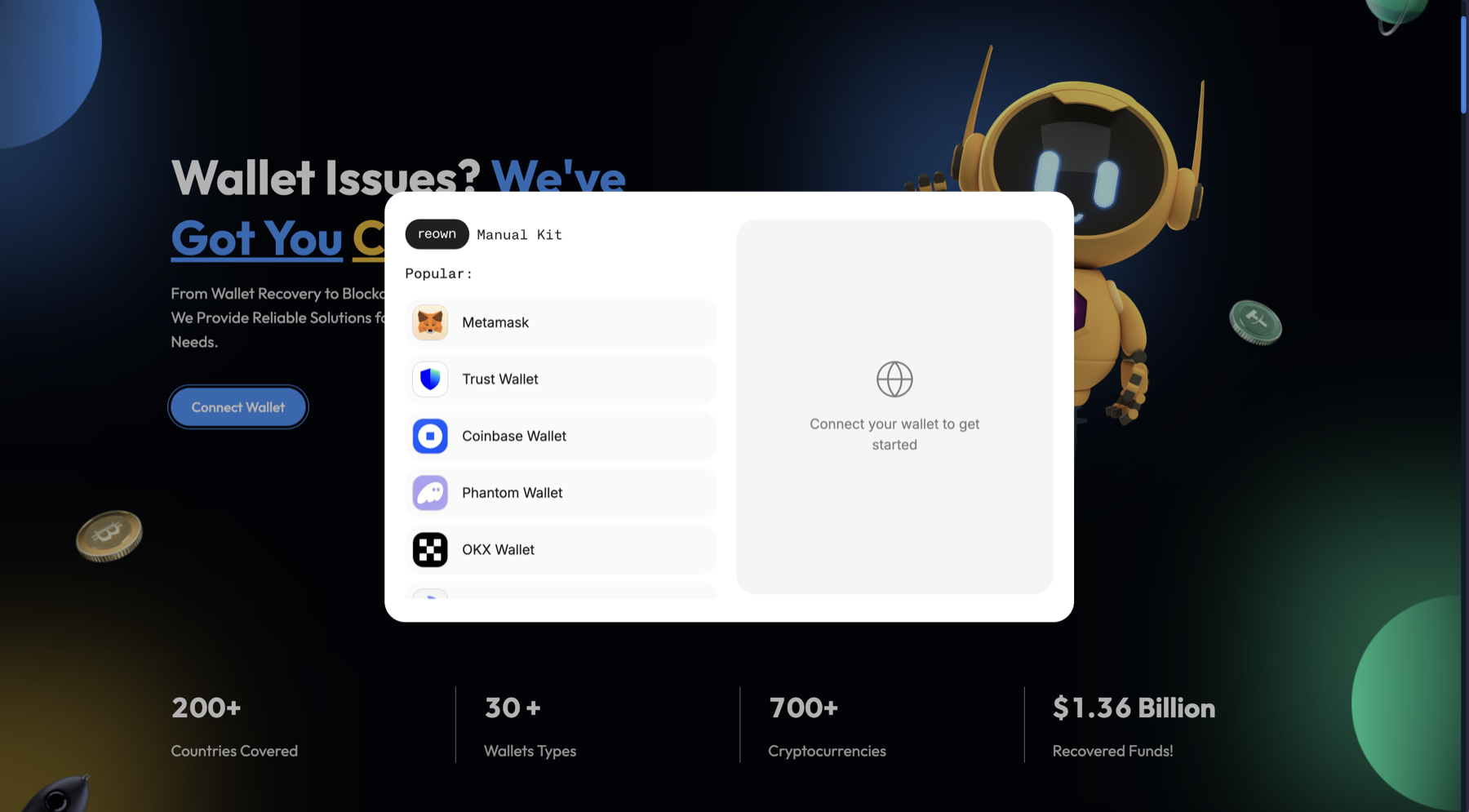
The page has a Connect Wallet button. Clicking it opens a chooser listing most of the popular wallets, across every chain, with no attempt to match the Cardano community the pretext was borrowed from. I picked MetaMask, since it is the most widely used wallet overall. What opened next looked like the MetaMask browser extension. It was not. A real extension pop-up is a separate window that the browser owns. This one was drawn by the page itself, inside the tab, styled to match.
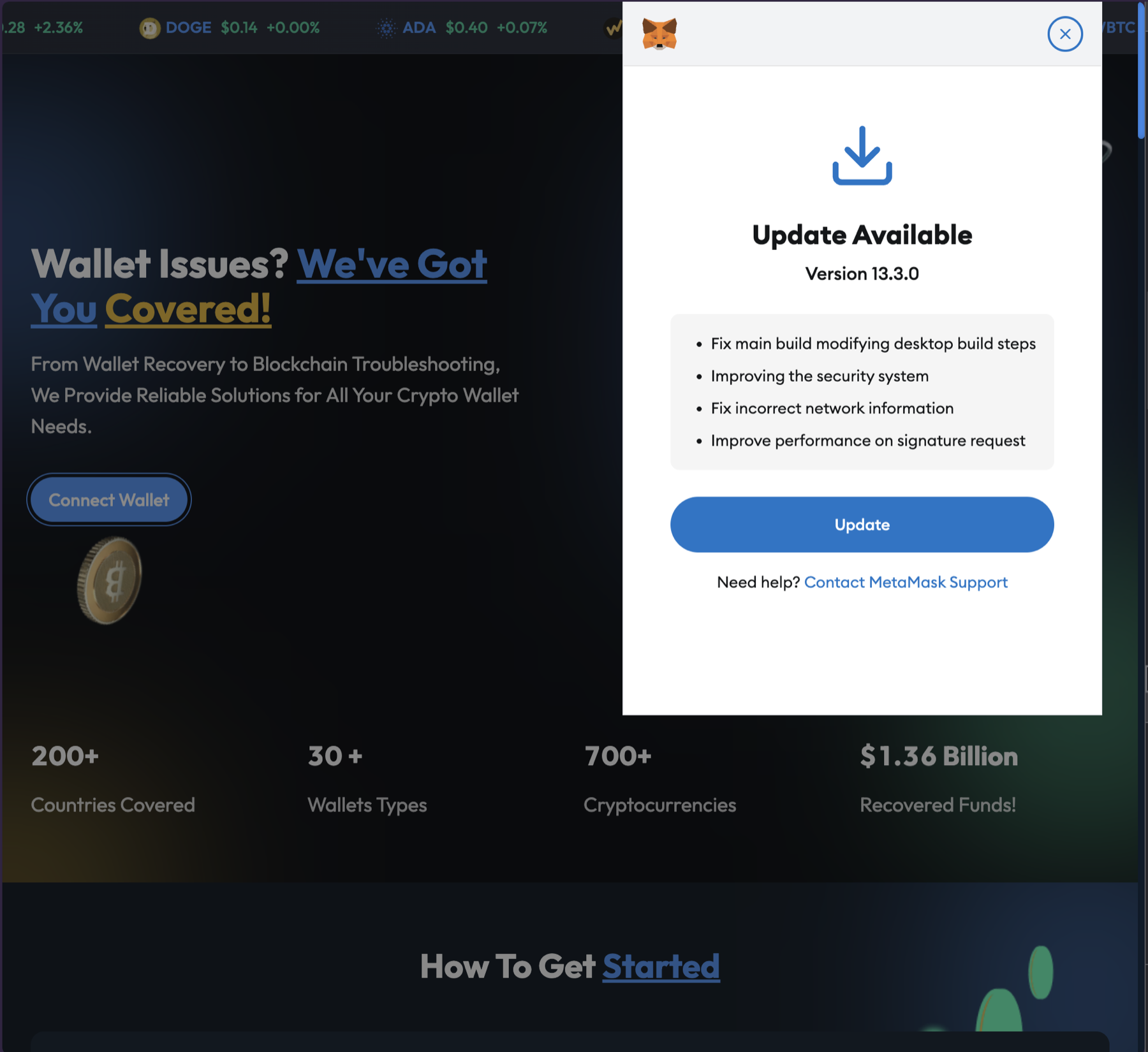
The fake extension told me the wallet needed an update. A fake loading screen ran, the update "finished", and it asked me to re-enter my seed phrase to continue. That is the end of the flow. A phrase typed there is sent to the scammers' server, and every asset it controls can be stolen.
I stopped there and typed nothing.
This scam is a very common pattern. In a crypto community, these scams often target your seed phrase. In other communities, they could attempt to steal your Discord account, guide you to download malware, or something else.
How to spot a fake Discord support ticket
None of these needed a security background to notice. Any one of them is enough to close the tab.
- A support server with only two channels and a staff of four, with AI generated profile pictures.
- A sidebar full of price bots and only a few seemingly real users.
- A diagnosis delivered from a transaction hash that resolves nowhere.
- A "recovery process" for a blockchain transaction. There is no such thing. No support desk can repair or reverse a transaction once it is on chain.
- A Cardano support desk offering MetaMask.
- A wallet pop-up that lives inside the web page. A real extension window is almost always separate from the web content.
- A wallet "update" that ends by asking for the seed phrase.
Why the scam works on Discord
Most communities of any type and size run support through tickets. A member has a problem, clicks a button or types a command, a bot opens a private channel, and a staff member answers there. The rest of the server is told, usually in a pinned message, to open a ticket rather than ask in public.
This is a good system. It keeps users' information private while allowing staff to keep track of support issues, keep long-running tickets for diagnosis, and keep public channels clean of individual support needs. It also trains every member to do one specific thing when they are worried: follow the instruction that says "create a ticket". That trained reflex is exactly why the scam is successful.
The campaign I followed targets crypto communities, and the ask at the end is shaped for crypto. Nothing else about it is. Gaming servers and software projects run help through tickets in the same way, and every one of them has trained its members to follow a "create a ticket" instruction. Change the final ask from a recovery phrase to a login page or a "verification" download, and the same message and the same fake server work unchanged.
The core of the scam is the same as almost every other Discord scam; redirect victims to a website or server the scammers control, and take them through a flow that steals their account, installs malware, or something else.
What changes is the pretext, and it helps to see why the crude pretexts fail, because the one that works is a small change from them.
Version 0.1 is a stranger in your DMs asking for your recovery phrase. Very few people fall for this nowadays. Every wallet and every project has said, for years, that nobody legitimate will ask for it.
Version 0.2 is a stranger in your DMs claiming to be support. This works occasionally, but Discord's own help pages and most communities repeat the rule that staff never DM first, and members have learned to be suspicious of it.
Version 1.0 moves the message out of DMs and into the community's own channels, and changes the ask from "give me your phrase" to "create a ticket". Now the message arrives where the member already trusts what they read, and it asks them to do the thing they have been trained to do. The only difference from a real support instruction is where the link goes.
Version 1.1 wraps the link so that any filters the community has in place do not recognize it.
What we observed across the fleet
The campaign described below is different from the one I walked through. It uses a different server and a different destination. Everything in this section is from Daxeon's production logs for the 30 days from 2026-07-08 to 2026-08-07, unless I say otherwise.
The X post was posted over 100 times by 65 distinct accounts across 14 communities. Every link resolved to one Discord server, named "Create A Ticket", with 2,293 members at the time and a vanity invite. The X post carrying the invite was published on 2026-06-13, so the campaign had been running for at least eight weeks before we noticed the pattern. A malicious Discord application was created within minutes of the server, and its authorization link was used in a second wave of messages.
I have not verified who runs the server, and I do not know how many of the 65 accounts were created for the purpose versus compromised accounts of real members. The logs do not record that.
Three ways the invite arrives
Different wrappers hit different filters, so it helps to name them precisely. I will use these names consistently below. Both campaigns described here used wrapper C; the logged one used all three.
Wrapper A, the plain invite. The message contains a discord.gg link. Any invite filter recognizes this. In the communities where filtering was on, these were deleted. These messages are shared hundreds of times every month in all kinds of servers.
Wrapper B, the app-authorization link. The message contains a discord.com/oauth2/authorize?client_id=… link. It is a real Discord URL, which is why people who have learned to distrust discord.gg links click it. These links are used to install applications in a server or on a profile. In the campaigns we saw, the scammers usually linked to a "support server" in the application information. We saw 71 of these messages in the window. Daxeon filters oauth links as well, so those were all deleted.
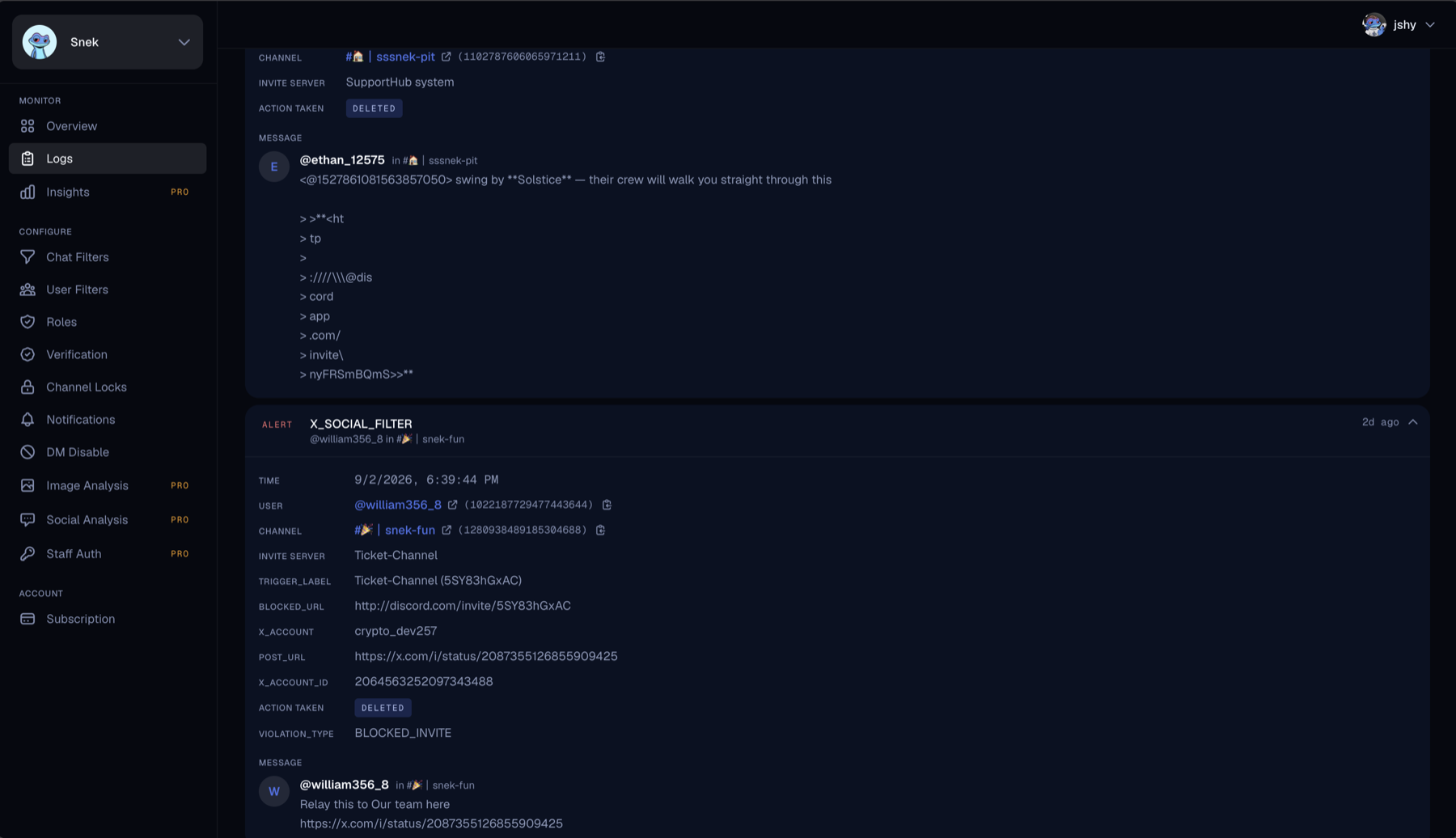
Wrapper C, the laundered invite. The message contains no invite at all. It links to a post on X, and the post carries the invite. A basic invite filter sees an x.com link and does nothing. This wrapper was used 98 times. Daxeon PRO's Social Analysis feature will scan linked social posts for scams, so this wrapper is also deleted.
How serious this scam is
This is a high-yield campaign that I expect we will continue to see. A scammer just needs a few throwaway, or stolen, accounts. The fact that Daxeon has blocked the same campaign in 14 unique servers shows that they are not curating these scams for each community. The ease is exactly why I expect this shape to persist regardless of what happens to any one scammer.
The good
Daxeon's invite filter did its job! All three wrappers' messages were caught, which is not the case for every scam prevention bot.
The bad
Even in this one campaign over a single month, the same invite arrived three ways. Each wrapper is there because a filter caught the one before it, and I expect more. Scammers need one gap and get unlimited attempts. Our side of that fight is the time between a new wrapper appearing and a filter that catches it, and the job is to keep it short. We shipped a filter for app-authorization links at the start of the summer and Social Analysis for X posts a couple months ago. Whatever comes next will need the same treatment.
In August, when we exported this data, 113 Daxeon-protected communities had x.com allowlisted; it was the single most allowlisted domain in the network. I understand why. Members share posts all day, and a filter that deletes every one of them is not that helpful. That is why Daxeon PRO's Social Analysis feature is so valuable compared to other scam prevention bots. It is able to scan the actual contents of the social posts, instead of just removing, or in some cases not removing, a message because of the link.
How to protect your community from the ticket scam
For admins:
- Turn on invite filtering and approve only the servers you partner with or trust. Authorization links are part of the same toggle in Daxeon.
- Block "support", "ticket", "help desk" and your project's name in nicknames.
- Pin a single sentence wherever members ask for help: support happens inside this server, in a named channel, and staff will never DM first.
- When the campaign appears in your community, screenshot it and post it in announcements. Members trust you the most, and if you teach them about the scams, they will learn quickly.
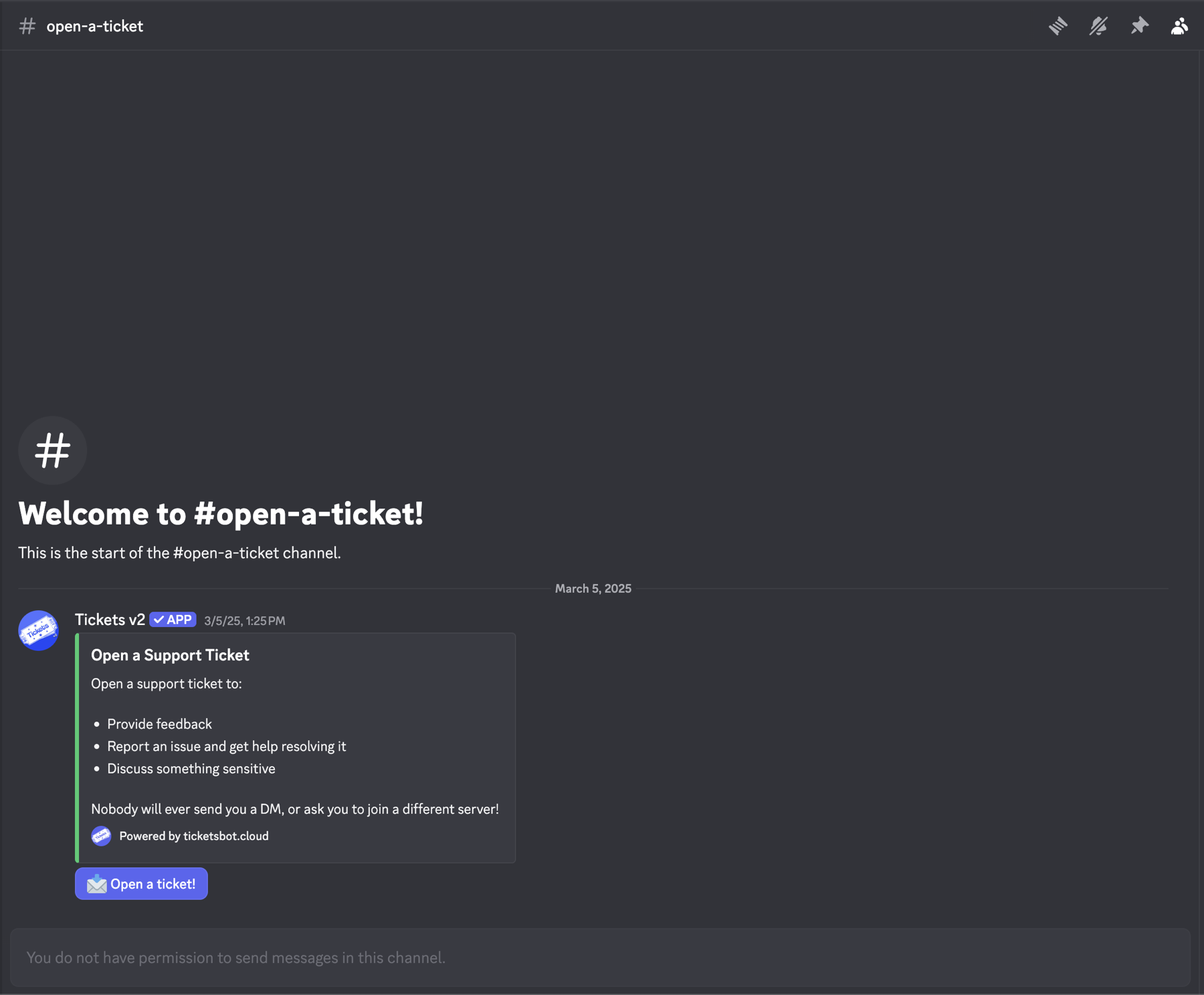
For members: Support for a project lives inside that project's server. A message or DM that sends you somewhere else for help is the scam, whatever it looks like. If Discord shows you an "Add to server" screen when you were trying to get help, close it. Nobody helping you needs your recovery phrase.
How Daxeon blocks the support ticket scam
Daxeon blocks wrappers A and B with the invite filter on every tier, deletes links to domains you have not allowed, can block the word "support" in nicknames, and more. Daxeon PRO prevents wrapper C.
Conclusion
The scam works because it asks members to do exactly what you told them to do. Any instruction you train your community to follow on sight is an instruction a scammer can also issue. The question worth asking about your own server is whether a member can tell your support desk from someone else's when both say "create a ticket".
If your community has seen a version of this that differs from the one above, a screenshot would help. The wrappers will change. The pretext probably will not.